Why maintaining your Google business profile professionally is crucial
The assumption that a Google company profile is a static entry is outdated. It is a dynamic communication channel and often the first point of contact that local customers have with a company. The profile functions as a digital business card and should therefore always be kept up to date.

An example: A local craft business with outdated opening hours or without pictures of current projects doesn't look very professional. In contrast, a profile that is regularly maintained with new work, seasonal offers and answered customer questions creates trust and imparts competence.
Active administration is therefore a central component of local marketing.
The importance for your local visibility
For local service providers such as craftsmen, hairdressers or restaurants, the Google company profile (formerly Google My Business) is essential. A large proportion of all Google queries have a local connection. Studies show that 42 percent of searchers Click on one of the results in the “Google Maps Pack.”
According to Google, companies with a fully maintained profile move 70 percent more likely visitors on and become 50 percent more likely to make a purchase considered. Further information on the market situation in Germany can be found in this article about Google market shares.
A well-managed Google business profile not only improves rankings, but also leads directly to calls, directions, and website clicks. It creates a direct connection to customers in the immediate vicinity who are ready to buy.
From digital figurehead to revenue driver
Consistent profile maintenance signals to the Google algorithm that your company is active, relevant and trustworthy. These factors are decisive for a better ranking in the “Local Pack”, the top results on Google Maps.
The benefits of strategic profile management are measurable:
- More interactions: This results in more calls, website clicks, and route planning.
- Better reputation: Responding to customer reviews shows appreciation and improves the corporate image.
- Higher conversion rates: An informative profile answers user questions in advance and motivates them to contact them.
Maintaining the Google company profile is a cornerstone of successful local SEO. Our guide to Optimize your local SEO strategy provides further information to achieve measurable business results from visibility.
Managing Profile Areas: An Operational Guide
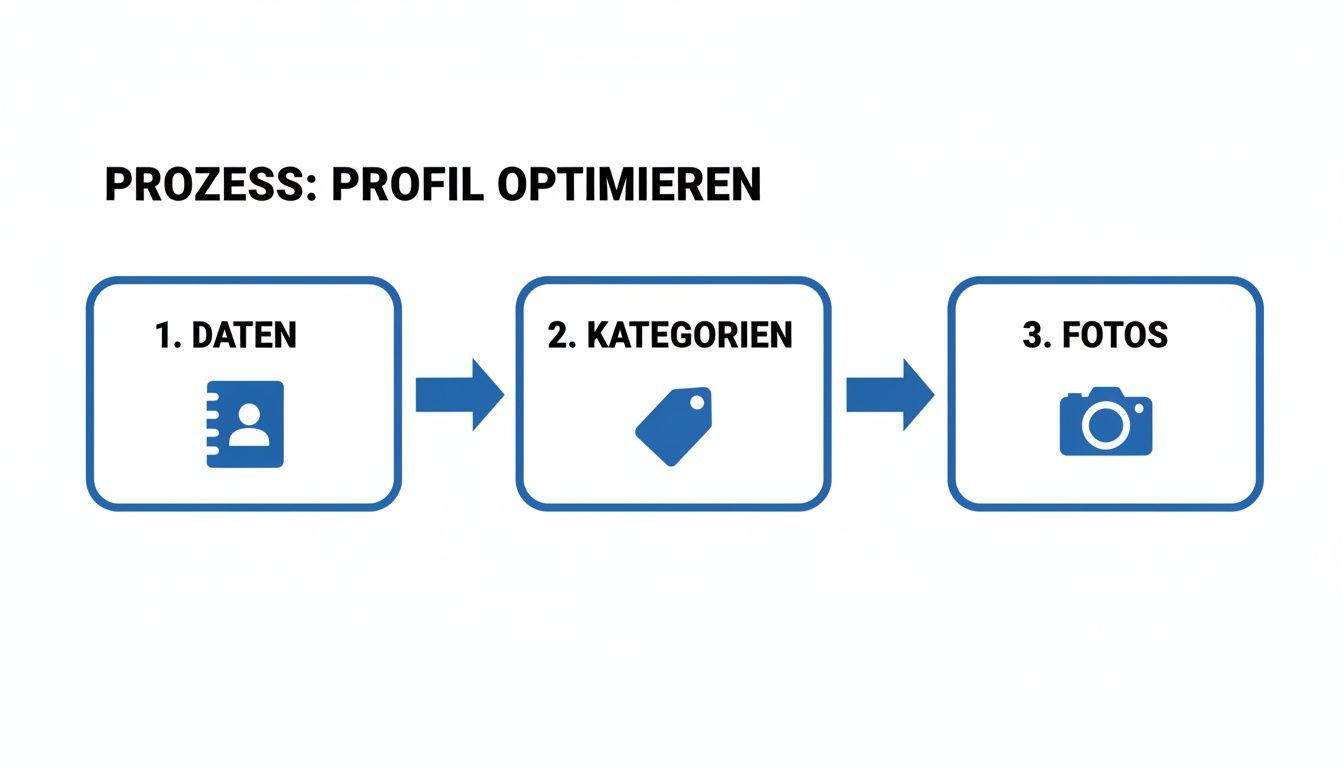
A strong Google company profile is based on complete and strategically completed information. Each area offers the opportunity to send Google clear signals about your company and convince potential customers.
Google Business Profile Roles and Permissions
In order to organize administration in a team, various access rights can be assigned. This ensures that only authorized people can make changes. Google primarily distinguishes between three roles:
- owner: Has full rights to the profile. He can add or remove other users, edit all information, and even delete the profile. Each profile must have at least one owner.
- Administrator: Has almost all rights of the owner, but cannot remove other users or delete the profile. This role is suitable for employees who manage the profile on a daily basis.
- Site manager: Has limited rights and can update basic information, respond to reviews, and create posts. However, it cannot change sensitive data, such as the primary category, or manage users.
A clear allocation of these roles is critical to ensure the data integrity and security of the profile.
Master data, categories and services
The basis of every profile is the consistency of master data. Company name, address and telephone number — the so-called NAP data (name, address, phone) — must be the same on all online platforms. Discrepancies can confuse the algorithm and weaken local authority.
Choosing the right categories is an important ranking factor. The main category should describe the core business precisely. For example, a craftsman specializing in bathroom renovations should choose “bathroom fitter” instead of the general term “craftsman.” Secondary categories serve to represent the further range of services (e.g. “heating installer”, “tiler”).
The areas services and products function as a digital shop window. Detailed descriptions and, where possible, prices create transparency and answer user questions proactively. This lowers the hurdle to making contact. High-quality images, prices and links to the website should be provided for products.
The power of visual presentation
High-quality photos and videos are for a professionally managed Google company profile essential. Visual content should be authentic and provide insights into the company.
Recommended image types:
- Outdoor shots: Help customers find the store.
- Interior photos: Convey the atmosphere and professionalism.
- Team at work: Create a personal connection.
- Products or results: Show the quality of work (e.g. before and after pictures).
360° photos or short videos can increase the time users spend on the profile, which is a positive signal for Google. A comprehensive guide to Google company profile provides further insights.
Care routines for long-lasting visibility
An optimized profile is just the start. Continuous maintenance is necessary to remain permanently visible in local searches. Regular activity signals to Google that the company is active and customer-oriented. A well-thought-out routine helps to manage expenses.
Daily tasks (approx. 5-10 minutes)
Short, daily activities have a great public impact and signal attention.
- Reply to reviews: Respond promptly to positive and negative feedback. A professional response to criticism shows appreciation and can strengthen the customer relationship.
- Answer questions in the Q&A section: Quick and helpful answers to user questions build trust and position you as an expert.
Weekly tasks (approx. 30-60 minutes)
Regular new content keeps the profile lively and relevant to the algorithm.
- Publish Google posts: Use posts to share current offers, news, or insights behind the scenes. Since posts lose prominence after seven days, a weekly post ensures a continuous presence.
- Upload photos and videos: Visual content increases interaction. Show off your team, new products, or business premises.
Monthly tasks
A strategic review should take place once a month.
- Check master data: Check that opening hours, telephone number and address are still correct. This information must be reliable, similar to a classic Business directory entry.
- Analyze performance data: A look at the insights shows how users find the profile and what actions they take. This data forms the basis for strategic adjustments.
Dealing with changes suggested by users
Users can suggest changes to their profile. These notifications should never be ignored. Review each suggestion and accept it if it's correct, or reject it if it's wrong. Otherwise, Google can automatically adopt incorrect information.
Relevant KPIs: Understanding and Using Performance Data
The performance data (KPIs) in the Google company profile are crucial for measuring the success of administrative measures and making data-based decisions. A regular look at the “Performance” tab is therefore essential.
If you have your Manage Google business profile, find out here how users find you and what actions they take.
Source of calls: Analyze search queries
The list of searches that users use to find your profile is a valuable source for market research.
- Identify keywords: Discover terms that customers use to find your offer.
- Validate strategy: See if you're being found for your most important keywords.
- Identify potential: Identify search queries for which you're not yet ranking and optimize your content accordingly.
Analyzing the search language of your customers makes it possible to tailor the profile precisely to their needs.
User actions as a performance indicator
The actions that users perform directly in the profile reflect their intentions. Here, Google breaks down clicks on “Call,” “Plan Route,” and “Website.”
- Calls: Indicate a high level of purchase intent or urgent questions.
- Route planning: Signal a planned or immediate visit.
- Website clicks: Show that users are looking for more detailed information.
This data provides direct recommendations for action. For many route plans, contributions about parking options, for example, could be useful.
What the KPIs mean for business success
The active maintenance of the Google company profile has a direct effect on sales. The most important ranking factors are Relevance (40%), Proximity (30%) and Recognition (30%). Click in Germany 42 percent the user on the Maps Pack. An optimized profile can save shop visits by up to 70 percent increase and purchase probability by 50 percent increase. More meaningful local search statistics show the potential.
Companies that actively post posts and respond to reviews often achieve stable top 3 rankings, which can result in 30 to 50 percent more inquiries.
The performance data is a compass that shows what works and where there is untapped potential.
Summary and next steps
A Google company profile is a dynamic marketing tool that only has its full effect when actively maintained. The professional Managing your Google business profile is crucial for local visibility and acquiring new customers. The analysis of performance data makes it possible to continuously optimize the local SEO strategy and tailor it to the needs of customers.
Start implementing today:
- Profile check: Check that all information is up to date.
- Answer open questions: Resolve unanswered customer inquiries.
- Refresh visual content: Upload a new photo or video
Regularity is the key to success. Small, daily interactions are more valuable than rare, large optimization actions. If you lack the time or know-how for consistent maintenance, working with a specialized service provider can be a useful alternative to exploit the full potential of your profile.
Frequently asked questions (FAQ)
When actively managing a Google business profile, recurring questions arise. Here you will find clear answers to the most common challenges.
How often should I post new posts?
Regularity is more important than a high frequency. We recommend at least once a week to publish a contribution. This signals activity to the algorithm and ensures that users always see a current post before it is moved to the archive after seven days.
What do I do if I have a negative review?
A negative review is an opportunity to show professionalism. Respond strategically:
- Respond promptly: A response within 24 hours shows appreciation.
- Stay professional: Thank you for the feedback and avoid an emotional response.
- Provide a solution: Suggest resolving the issue offline (via phone or email).
Responding confidently to criticism can strengthen the trust of potential customers.
Can I manage multiple locations with one account?
Yes, about so-called Location groups (formerly corporate groups). This allows you to centrally manage all profiles and display changes such as new opening times or promotions for all locations at the same time. This saves time and enables targeted allocation of rights within the team.
What if I want to delete my company profile?
Permanently deleting a profile is an irreversible step that results in the loss of all data. If the store is only closing temporarily, the “temporarily closed” option is more appropriate. If permanent deletion is necessary, you will find instructions in our article on how to Delete a company profile on Google Can.
Why does my data sometimes change by itself?
Google obtains information not only from you, but also from other online sources and from users (“suggest a change”). If the system finds different information, it can automatically adjust your profile.
Professional tip: Monitor your email inbox for notifications of suggested changes. Respond immediately to reject incorrect adjustments and maintain control over your profile data.