Causes of missing Google reviews
The moment when you notice that valuable customer testimonials no longer appear in your profile can be a shock for any local business. Regardless of whether you run a restaurant, a craft business or a law firm — these reviews are a decisive vote of trust.
The good news is that there is usually a logical explanation and a concrete way to solve the problem. Many entrepreneurs experience that their review profile appears incomplete overnight — often without warning.
Why reviews are important for your business
Customer reviews are more than just a few stars next to your company name. They are an important factor in acquiring new local customers and shape the first impression that potential customers get of you.
Their importance has increased in recent years. A study shows that the number of reviews among companies increased by almost 50% Has risen. Read at the same time 98% online reviews of consumers before they choose a provider. Detailed analyses can be found at bewertungsbeseitiger.de.
A healthy review profile shows Google and your customers that your company is active and deserves trust.
An overview of the most common causes
Before we get into the details, let's take a look at the usual suspects. In practice, the problem can almost always be traced back to one of these areas:
- Google's automated filters: The algorithm is alert to weed out spam and fake reviews. Sometimes he also mistakenly catches real reviews.
- Policy violations: Often this happens unconsciously. Evaluation from your own workplace, reviews from employees, or offering discounts for feedback are examples that Google regards as a violation.
- Technical or administrative issues: Have you changed your company name or address recently? Such adjustments to the profile may temporarily hide reviews. There are also server-side errors at Google itself.
In rare cases, the problem may be deeper. If your entire profile is affected, read our guide on what to do if your complete Google Business Profile Blocked What
The table below gives you an overview of the most likely reasons and what you can do first.
Overview of the most common causes of lost reviews
This table summarizes the primary reasons why Google reviews are no longer visible and gives a first clue about the solution.
Cause brief descriptionPossible solutionspam filterGoogle's algorithm mistakenly classified the review as spam or fake. Identify the review in question and request a manual review via Google Support.Policy violationThe review (or reviewer) violates Google Content Policy. Ask the customer to adjust the review. Personal initiative is hardly possible here, as Google respects data protection.Profile changesAddress or name changes, merge profiles. Be patient (can take up to several weeks) or contact support if reviews don't reappear.Temporary bugA technical error on Google's part. Wait and check the status in the Google Business Profile Help Forum. Often, these problems resolve themselves.
With this knowledge, you are prepared to address the problem systematically. This guide takes you step-by-step through the process of finding the cause and recovering your reviews.
Analyzing the reasons for the loss of Google reviews
To solve the mystery of disappearing Google reviews, we need to understand why they disappear in the first place. That rarely happens indiscriminately. There are almost always mechanisms behind this, which are either at Google itself, at the customer's site or directly at your company.
If you know the logic behind these mechanisms, you can better assess the situation and take targeted action. Let's take a closer look at the three main suspects.
Google's spam filter: The invisible guards
Google invests resources in technologies that should ensure real and authentic reviews. A complex algorithm that spam filter, check every review for suspicious patterns in real time. The only problem is: Sometimes he is a bit overzealous and also captures legitimate customer testimonials in the process.
What triggers an alarm with this filter? Here are a few typical signals:
- Reviews from the same IP address: If several positive reviews come from the same WiFi network — be it your company network or a public hotspot — this can be considered an attempt at manipulation.
- Generic or unnatural texts: A five-star review with no text or just a “Great Service! “Is of little significance for the algorithm. If there are many such reviews at once, it looks suspicious.
- Distinctive user profile: Did the reviewer create their Google account recently and then immediately leave a review? Or has he reviewed 20 other companies in the last hour? Google often classifies profiles as implausible.
- Links or too many special characters: Reviews that contain URLs or a flood of exclamation marks are almost always automatically marked as spam.
These filters are the most common reason why an honest review isn't publicly visible. The customer may still see it in their own profile, but it remains invisible to everyone else.
Unnoticed violations of Google policies
Another classic is unintentional policy violations. Many entrepreneurs are not aware that certain actions by Google are considered an undue influence. It's not just about purchased reviews, but also about more subtle things.
One example is the Conflict of Interest.
A review by an employee, spouse, or close relative is a direct violation of Google guidelines. Even if it's meant honestly, Google sees bias here and is likely to remove it.
Other typical pitfalls include:
- Reviews from your own workplace: Asking a customer to leave a review directly in the shop via company WiFi can be identified as manipulation.
- Create incentives: Offering Discounts, Vouchers, or Participating in a Competition in Exchange for a Review is prohibited.
- Review stations (review kiosks): Setting up a tablet in the entrance area that actively asks customers to rate is also a violation of the terms of use.
A clean and well-maintained profile is the best insurance against such problems. In our guide to managing your Business Profiles on Google Let's go into detail about how to avoid such mistakes.
Technical errors and administrative changes
Sometimes the problem isn't with the assessment itself. Technical glitches or administrative changes to your profile may also cause reviews to disappear temporarily.
This is often the most frustrating category because the cause isn't obvious at first glance. Here are common technical reasons:
- Changes to master data: Have you recently changed your address, company name, or main category in your profile? Search adjustments can trigger re-indexing. Reviews can become temporarily invisible and often only reappear after a few days or weeks.
- Merging profiles: If you've merged two duplicate profiles for the same location, reviews may be lost in the process.
- Server-side issues with Google: That also happens. Sometimes the fault lies directly with Google, so reviews are not displayed correctly. Search bugs are usually fixed by Google itself after a while.
Analyses show that a disproportionate number of negative reviews have been removed in Germany. This is due to the specific legal situation, which enables companies to take legal action against false or business-damaging statements. More about these You can find out about developments on Tageskarte.io.
Once you have an idea of what might be the cause of your missing Google reviews, we can move on to the next step: recovery.
A guide to recovering your reviews
If you find that reviews are missing, a systematic approach makes sense. The first route should take you directly to your Google Business Profile Dashboard — this is the Command Center for your local online presence and often the place where you can find initial clues.
Before you contact support, you should rule out obvious causes yourself. This saves time and allows you to provide the Google team with precise information later if necessary.
Use your company profile as a diagnostic tool
Your Google Business Profile is your most important diagnostic tool. First, take a look at the overall status of your profile. Is there an alert or notification from Google on the dashboard? Problems are often pointed out directly here, for example when a new verification is necessary or the profile has been otherwise restricted.
So take a look at the “Services” section. Sometimes reviews haven't really disappeared, but there's a display error. Count the visible reviews manually and compare the number with the one Google shows. If the numbers differ, this is often a temporary problem.
The process that explains why Google reviews disappear typically involves three main causes: automatic spam filters, policy violations, or technical errors.
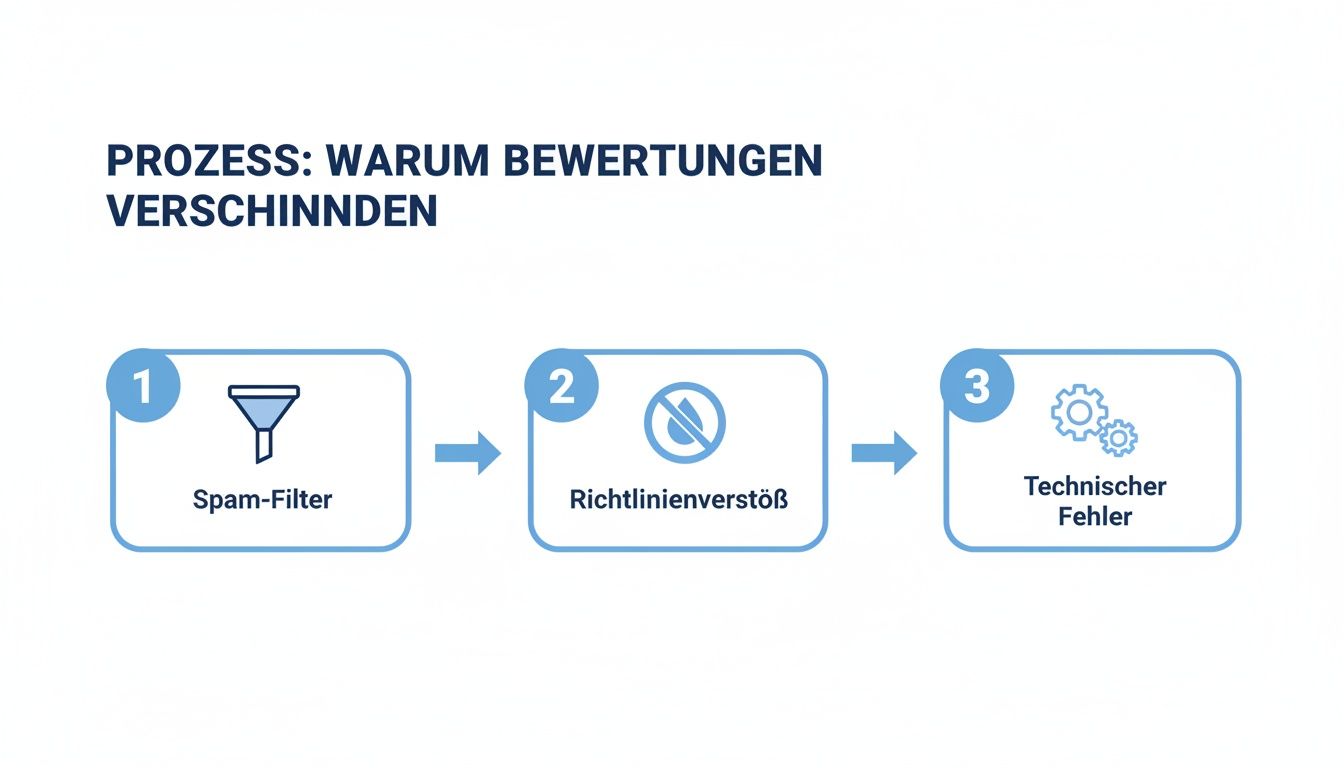
As you can see, the reasons are manifold. A targeted analysis is essential to find the right solution.
The honest comparison with Google guidelines
If everything seems okay on the technical side, the next step is to reconcile it with Google guidelines. Go through the missing review in your head and ask yourself openly: Could it — perhaps unintentionally — have broken a rule?
- Conflict of interest: Did the review come from an employee, a family member or was it submitted from the company WLAN?
- Prohibited content: Did the customer perhaps include a link or a telephone number in the text? What offensive language used?
- Evaluation versus incentive: Did you offer the customer a discount or coupon for writing the review?
This self-reflection is important. If the review clearly violates a policy, the chances of getting it back are low.
Be honest with yourself about this. It's about understanding why Google's algorithm was triggered. This is the only way to prevent you from losing further reviews in the future.
Communicate effectively with Google Support
Have you checked everything and are sure that a legitimate review was wrongly removed? Then it's time to contact Google Support. A well-prepared and precise request makes the difference here.
Avoid blanket inquiries like “My reviews are gone.” Be as specific as you can. A good support request should include:
- Your exact company name: Exactly as it is in the profile.
- Your full business address: With street, house number, zip code and city.
- Direct link to your company profile: The link that you can copy using Google Search or Maps.
- Information about the missing review: If you have the data — the name of the customer, the approximate date and what the content was about. A screenshot is useful here.
- Your profile ID: These can be found in the advanced settings of your company profile.
With these details, you provide the support agent with all the information they need to review your concern. A well-maintained profile makes a better impression. In our guide, we'll show you how to make your Manage Google Business Profile the Right Way.
Sample template for your support request
To help you get started, here is a tried and tested template that you can adapt to your situation:
Subject: Missing legitimate customer review for [your company name]
Message:
Dear Google Support Team,
I'm reaching out to you because one or more legitimate customer reviews are no longer visible from our Google Business Profile.
Company name: [Your exact company name]
Adresse: [your full address]
Link to profile: [link to your profile]
Profile ID: [your profile ID]
Missing review details:
- Reviewer's name: [name, if known]
- Review date: [Approximate date]
- Content (if known): [Brief description of content]
- screenshot: [Attach a screenshot if available]
We've reviewed Google's content guidelines and are convinced that this review (s) was (en) compliant. We therefore ask you for a manual check and a possible recovery.
Thank you so much for your help.
sincerely
[your name]
This structured approach is the best way to solve the “Google Reviews Disappeared” problem.
How to specifically prevent the loss of reviews
It is often better to act with foresight than to react to problems afterwards. Instead of waiting for reviews to disappear, you can proactively strengthen your Google profile. A stable and trustworthy profile is less often mistakenly classified as problematic by Google's algorithms.
The key to this is a continuous and authentic stream of new feedback. At the same time, a professionally maintained profile signals to potential customers and Google that you take your business seriously.
Actively obtain authentic feedback in accordance with guidelines
The best buffer against losing individual reviews is a steady supply of new ones. But what's the best way to ask customers about it without violating Google guidelines? The trick is a subtle, service-oriented request that makes the process easy.
Refrain from direct incentives such as discounts or sweepstakes in exchange for a review. Instead, use simple methods:
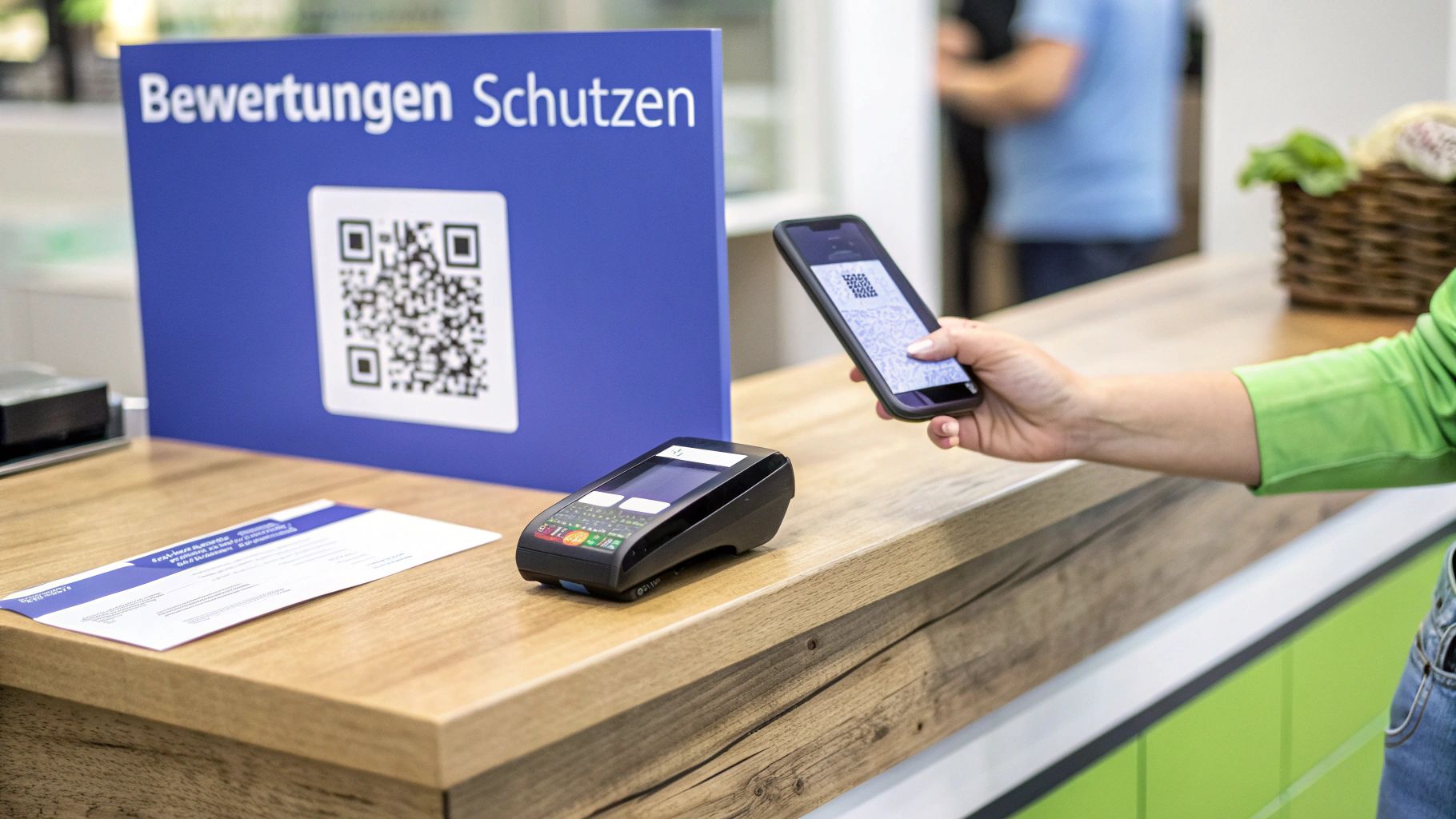
- QR codes in stores: A QR code that leads directly to the evaluation form is useful. Place it at the cash register, on tables, or in the waiting area.
- Notes on invoices: A short, friendly sentence like “Were you satisfied? We'd love to hear your feedback on Google! “Looks likeable.
- Email signatures: Integrate a direct review link into your employees' email signature.
- The personal question: When a customer expresses their satisfaction, it's a good moment. A simple “We're very happy about that! If you have a moment, a quick review on Google would help us out” is legitimate.
These tactics work because they don't put pressure on the customer.
Regular monitoring and rapid responses
An actively managed review profile is a strong signal — to Google and to your customers. This includes responding promptly and professionally to new reviews, regardless of whether they are positive or critical.
A study by BrightLocal found that 89% of consumers Are more likely to buy from companies that respond to their reviews.
Make it a habit to check your profile regularly. This allows you to quickly notice when reviews are missing and respond to new feedback. This strengthens customer loyalty and can improve your local ranking.
A well-maintained profile as a shield
A complete and professionally maintained profile is less susceptible to sudden problems because it radiates trustworthiness and relevance to Google.
What is important is the consistency of your NAP data (name, address, telephone number). These must be the same on your website, Google Profile, and all other online directories.
In addition, you should not neglect these points:
- Latest photos and videos: Show off your business, your team, your products, the atmosphere.
- Regular Google posts: Inform about offers, news or events.
- Complete services/products: List your full offering.
- Well-maintained Q&A area: Proactively answer frequently asked questions.
Ratings are a key ranking factor, but overall profile activity plays an equally important role. According to the Whitespark Report for Local SEO Factors, Reviews in Germany Make Around 20% Off the ranking signals. More 32% Are attributable to activities and entries in the profile itself. More about these relationships You can read it on alex-hauk.de.
A strong foundation of a well-maintained profile and a steady flow of authentic reviews is the best way to avoid having to search for missing Google reviews in the first place.
Checklist for a healthy evaluation profile
A simple checklist can help to keep track of things. Here's a suggestion on how you can break down maintaining your profile into daily, weekly, and monthly tasks.
Task FrequencyWhy it's ImportantCheck and Respond to New ReviewsDailyQuick Responses Promote Customer Loyalty and Signal Google Activity.Check Questions in the Q&A SectionEvery DayShows Engagement and Potential Customers Make Decisions.Create a New Google PostWeeklyKeeps Your Profile Up to Date and Informs Customers About News or Offers.Add Photos or Videos WeeklyVisual Content Increases Engagement and Time Spent on Profile.nap data check for Consistancy.nap data check for Consistancy.nap data check for Consistancy.nap data check for Consistancy.nap data check. NAP data check for consistancy.NAP data check for consistancy.NAP data check for consistancy.NAP data check. NAP data check for consistancy.Add photos or videos weeklyVisual content increases engagement and time spent on profile.nap data check for consistancy.nap data check for consistancy.nap data check for consistancy.Add photos or videos weeklyVisual content increases engagement and time spent on profile.nap data check for consistancy.nap data check for consistancy.nap data check for consistancy.nap data check for consistancy.nap data check for consistancy.nap data check for consistancy.nap data check for consistancy.nap data check for consistancy.nap data check for consistancy.nap data check for consistancy.nap data check for consistancy.nap data check for consistancy.nap data check for consistancy.nap data check for consistancy.nap data check for consistancy.nap data check for consistanAnd confusion.Update services/products monthlyensures that offering is always up to date.
This routine can become a useful tool for sustainably protecting and expanding your online reputation.
Dealing with unfair and fake reviews
So far, it's been about protecting genuine reviews. But what if a review appears on your profile that hasn't lost anything there — be it insulting, demonstrably false, or from someone who has never entered your store.
An unfair review can shatter the trust of potential customers. This is about protecting your business from targeted attacks and misuse. Google provides tools to combat such content.
When does a review really break the guidelines?
Before you report a review, you need to be sure that it actually breaks the rules. Not all negative criticism is automatically a violation. A subjective opinion, even if it is formulated harshly (“I didn't like the food”), is usually admissible.
It becomes relevant when the evaluation goes beyond simply expressing an opinion. Google has a clear list of prohibited content. This includes:
- Conflicts of interest: Reviews from own employees (including former employees), competitors or people who were paid for a positive review.
- Hate speech and harassment: Any content that attacks people or groups because of their origin, religion, sexual orientation, or other characteristics.
- Private information: The publication of telephone numbers, addresses, or other personal information.
- Spam and fake content: Reviews that aren't based on a real experience, come from bots, or just include promotional links.
- Misrepresentation: This is about demonstrably false facts. If someone says: “The company is closed on Sundays,” even though you are open, that is a clear case.
The difference often lies between opinion and statement of fact. “The coffee was too strong for me” is an opinion. “An insect swam in coffee” is a statement of fact. If the latter is not true, you have a basis for reporting.
The Reporting Process Explained Step by Step
Have you found a review that violates one or more of these rules? Then you should report them. The process is simple and can be done directly from your Google company profile.
- Find a review: Go to your company profile and scroll to the review in question.
- Use the reporting function: Click on the three dots next to the review and select “Report a review.”
- Select a reason: Google now wants to ask you the reason for the report. Choose the appropriate option, such as “conflict of interest” or “hate speech.”
- Send message: Follow the prompts and submit your report.
After you submit the report, Google will review the case. This process may take a few days or weeks. You will usually not receive any feedback — you will find out whether the review has disappeared or not.
When a lawyer is the better choice
What if Google rejects your report but you're convinced the review is unlawful? In Germany, legal protection against slander and credit-damaging false statements is strong. If an appraisal damages your business and publishes demonstrably false facts, going to a lawyer may be the next step.
A lawyer specializing in IT and media law can professionally assess the review and ask Google to delete it directly with a so-called “notice and takedown letter.” Search letters often have a higher success rate because they legally explain why the review not only violates Google guidelines but also German law.
Especially in the case of serious allegations or targeted reputation campaigns, this is an important option to limit the damage to your company. If you would like to dive deeper into the legal background, please read our article on Deleting Google reviews Further details.
How to get your Google profile on track
The fact that Google Reviews suddenly disappear is a nuisance. But the good news is: In most cases, the problem can be solved. Most of the time, Google's automated spam filters, a policy violation, or a temporary technical error are behind it.
The path to a solution is a well-considered process. It's about systematically auditing, contacting Google Support with the right information and, above all, being proactive in the future.
Being proactive is key. Anyone who continuously maintains their profile minimizes the risk of losing reviews and strengthens their visibility and the trust of potential customers.
So don't wait until problems arise. A well-maintained Google Business Profile is your most powerful tool for securing your reviews, moving up in local rankings, and continuously acquiring new customers.
If you would like professional assistance to protect your reputation and make your profile invincible, we are here for you. Our goal is to get you to the top of local search results even without an expensive advertising budget. In our further article, we will show you how to set the course for long-term success, in which you will learn how to set your Optimize your Google My Business Profile.
Frequently asked questions (FAQ)
When Google Reviews suddenly disappear, entrepreneurs keep asking the same questions. The most important answers are summarized here.
How long does it take for reviews to come back?
There is no general answer; the duration depends heavily on the cause. Sometimes it's just a minor technical error. In such cases, reviews often reappear A few days Back on by itself.
Patience is required if you need to turn on Google Support. That's when the process can drag on. Calculate here A few days to several weeks. The more specific your request is, the faster it usually goes.
Will the loss damage my ranking forever?
Don't panic! Losing a few reviews in the short term usually won't permanently damage your ranking. Google's algorithm looks at your profile as a whole and over a longer period of time.
It becomes critical when a large number of reviews Disappears permanently. This can affect your profile's authority and pull you down in local search results. It is therefore important to find the cause and to ensure that new, authentic reviews are constantly being followed.
Are there any warning signs I should watch out for?
Yes If you notice any of the following, take a closer look:
- There are no more new reviews: You know that happy customers have written reviews, but they don't show up? It's a sign that your profile is being filtered.
- Your ranking suddenly drops: A significant crash in local search results may be related to reviews issues.
- You'll receive notifications on the dashboard: Take a look at your Google Business Profile regularly. Google itself sometimes points out problems there.
Anyone who actively keeps an eye on their profile will recognize such warning signs early on.
Summary and next steps
When Google reviews disappear, the cause is usually Google's spam filters, policy violations, or technical errors. The best protection is a proactive approach: Maintain your Google business profile carefully, continuously collect authentic feedback, and respond quickly to new reviews. This not only strengthens your profile against losing reviews, but also improves your local ranking and creates trust with potential customers.
Would you like to ensure that your company is well positioned online? Find out how we can help you on our website: https://www.socialedge.ai.