Delete, remove, or close access: The difference
Managing a Google business profile requires a strategic approach, especially when the circumstances of your business change. Many act hastily here and click “Delete,” although another option would make more sense. To make the right decision for your situation, you need to thoroughly understand the three main actions and their consequences.
What the different options mean
Every action has far-reaching consequences for your online visibility and the customer data you have collected over the years.
- Permanently delete profile: This is the most radical and irreversible step. All content associated with your profile — photos, posts, customer reviews, and ranking signals — disappears from Google forever. This option only makes sense if the company completely ceases to exist and there is no reason to preserve the digital history.
- Remove your access: As a manager or owner, if you only remove your own access, the profile remains unaffected and still exists. You just won't be able to manage it after that. This is the right solution if you hand over responsibility to a new owner or marketing agency.
- Mark as permanently closed: In most cases, this is the best alternative to permanent deletion. Your profile remains visible online, but customers are notified that your store is no longer active. The decisive advantage: You keep all your valuable reviews and the established digital presence.
This decision tree visualizes the various paths and helps you find the right option for your situation.
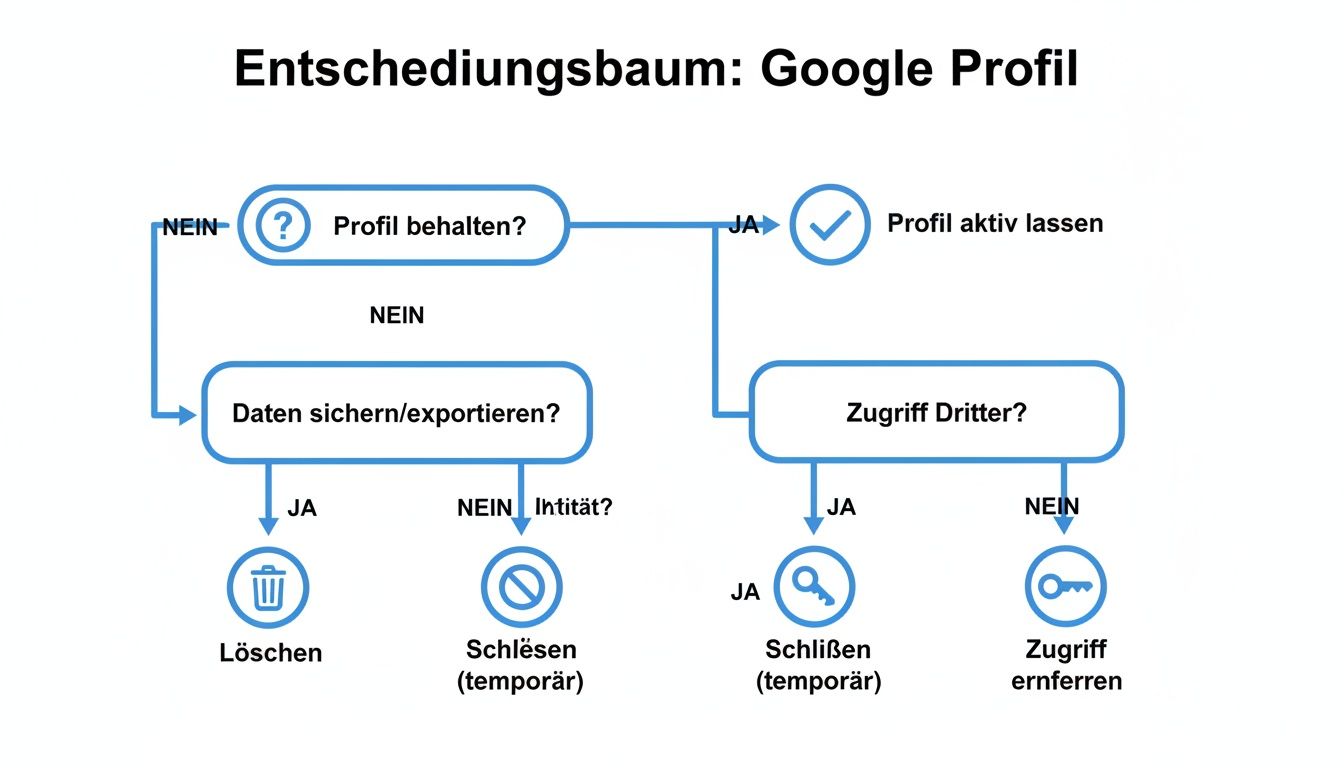
You can see here that permanent deletion is the rarely recommended measure.
Comparison of options: delete, remove access, close
This table compares the consequences of the three main actions to help you make the right decision.
ActionImpact on profile visibility for customersWhen does it make sense?Permanently deleteProfile and all content (photos, reviews, posts) are permanently removed. No longer visible in search or maps. The company no longer exists and there is no successor.Remove accessProfile remains online unchanged. Only your personal account will be removed. Fully visible but no longer manageable by you. Transfer to a new owner, agency or other manager.Close permanentlyProfile remains visible but is clearly marked as “Permanently closed.” Visible, but customers know that operations have stopped. Reviews are retained. Business abandonment, relocation, or if the digital history (e.g. reviews) is to be retained.
Choosing the right option depends heavily on your individual situation and should be carefully considered.
How to delete a Google business profile
Have you considered everything and have come to the conclusion that your Google business profile should be permanently removed? Sometimes that's the only right move. Here are instructions on how to safely remove the profile.
The first step is right in your Google profile dashboard. If you manage multiple locations, check carefully that you have selected the correct profile. An incorrect click cannot be undone.

Step-by-step deletion guide
The process itself is straightforward. Be aware of the far-reaching consequences with every click.
- Sign up: Open your Google company profile with the account that is registered as the owner.
- Open settings: Click on the three dots next to your profile name and select”Business profile settings”.
- Select an option to remove: In the settings, you will find the item”Remove company profile”. Here, you can remove content and managers, or delete the entire profile.
At this point, Google gives you two options: remove only the content and managers or delete the profile completely. For a final removal, the latter is the right choice.
Pay attention to Google's warnings
Before the final click is made, Google displays warnings. Take them seriously because it's your last chance to reconsider the decision. Google makes it clear: “If you continue, the profile and all associated content will be permanently removed.” That means all posts, photos, and customer reviews are gone forever.
The following screenshot shows the view in which you make the decisive selection.
Google clearly distinguishes the option of permanent deletion from pure content removal.
Once you've confirmed the deletion, there's no turning back. Your profile is removed from your account and gradually disappears from Google Search and Maps. It may take a few days or weeks for it to completely disappear.
What to do if you are not the owner of the profile?
It often happens that there is a company profile that you do not have access to. Perhaps a former employee created it or it was created automatically by Google. They are not helpless at the mercy of this situation. Google provides clear ways to help you regain control.
The aim is to claim legal ownership of the profile. Instead of creating a second profile (which confuses customers and hurts your ranking), adopt the existing one. Creating a new profile is almost never the right solution.
If you're starting from scratch, you'll find all important steps in our guide to Create a Google business profile.
Claim ownership of an existing profile
Search for your business on Google or Google Maps. In the profile, you will usually find a link with the question”owner of this company?”. Clicking on it starts the official process.
Google needs to make sure that you're the rightful owner. To do this, you must verify yourself, usually via:
- postcard: A code is sent to the business address.
- Phone call: An automated call to the official phone number transmits the code.
- email: An email to an address that belongs to the company domain.
If someone is already registered as an owner, Google will let them know about your claim. If this person doesn't respond on time, you can complete the verification process and take control.
Correct incorrect information with “Suggest a change”
If you just want to correct an obvious mistake, such as an outdated address or incorrect opening hours, use the function”Propose a change”. You can find this option directly in the company profile. Every user can submit corrections, which Google usually implements after a brief review.
Risks of deletion and when it's not recommended
Clicking on “Delete” is not a simple administrative task, but can seriously affect your digital visibility. Before you take that final step, you should understand the strategic drawbacks for your local SEO.
The consequences are usually immediately noticeable and affect not only your ranking, but also how potential customers find you.
Immediate loss of visibility in the local pack
The biggest downside: They disappear from the most valuable areas of local Google search — the Local Pack and the Map search results. If your profile is deleted, your company no longer exists for Google in that location. If customers search for “hairdresser near me,” you are invisible to them.
The result is a direct drop in important customer interactions:
- No calls via the “Call” button.
- No directions per click.
- Fewer clicks on your website.
Irreparable loss of customer reviews
Losing all collected customer reviews is particularly painful. This Social Proof is a powerful marketing tool. Good reviews create trust and are an important ranking factor. By deleting your profile, you destroy your entire digital reputation and start from scratch.
When deleting is the wrong decision
In many situations, deletion is not only superfluous, but also harmful. There are almost always better alternatives out there that protect your SEO benefits.
Here are cases where your profile Don't delete should:
- Change of owner: Transfer ownership to the new owner. In this way, all ratings and ranking history are retained.
- Temporary closure: Use the “Mark as temporarily closed” option. This informs your customers without permanently removing your profile.
- Relocation of the company: Update the address in profile settings. This is how you take your visibility and reviews with you.
Deleting is a final step that can set back your local search engine optimization. Consider the alternatives carefully. If you want to strengthen your position, check out our guide on how to make your Improve Google Maps ranking.
When does it really make sense to delete a Google business profile?
You don't delete a Google business profile lightly. This step is usually the result of a well-considered decision arising from everyday business life or from legal issues such as data protection.
Operational reasons: When deletion is the only solution
In business, there are classic situations in which deleting the profile is unavoidable.
The most common triggers include:
- The store is closing forever: The company is discontinued, there is no successor and the brand will not be continued.
- Duplicate entries: Sometimes there are multiple profiles for the same location. This confuses customers and weakens your position on Google. This must be cleaned up and the superfluous profile removed.
- Serious policy violations: In rare cases, a profile can violate Google policies so severely that deleting it is the best way to make a fresh start.
For deeper insights into search engine usage in Germany, you can interesting information on luna-park.de.
Legal aspects and the GDPR
In addition to operational reasons, legal issues such as the General Data Protection Regulation (GDPR) come into focus when personal data appears in the profile.
A request for deletion can also come from outside. If personal data unlawfully appears in your profile (e.g. in a review), the data subject has a “right to be forgotten” and can request removal. You must take such inquiries seriously. If you would like to delve further into the legal basis, we recommend reading the Privacy Policy and our own Privacy policy here at SocialEdge.
Summary and final recommendation
Managing your Google business profile is a strategic decision. Before you trade, you need to understand the differences between permanent deletion, the Remove access and the mark as “permanently closed” understand. A hasty deletion can irrevocably destroy your local visibility and reputation built up over the years.
Our recommendation is that permanent deletion should always be the last option. Only consider this step if your company actually and irrevocably ceases to exist. Consider carefully whether alternatives are not the smarter solution for your situation.
If you are unsure which path is right for your company, seek professional advice to avoid long-term damage to your online presence. Contact us for professional advice, we help you to ensure the visibility of your company in the long term.
Frequently asked questions
Here are brief answers to the most pressing questions about deleting a Google business profile.
Can I restore a deleted profile?
No As soon as a profile is permanently deleted, there is No way back. All reviews, photos, and posts are irrevocably removed. They would have to build a completely new profile.
How long does it take for my profile to disappear?
The profile usually disappears from your Google account immediately. However, it may take a few days or weeks before the listing is finally removed from Google Search and Maps.
What happens to my customer reviews after they are deleted?
All reviews are also permanently deleted. This is often the biggest loss. A better alternative when abandoning business is to mark it as “permanently closed”, as this keeps the reviews visible.
Do I have to delete my profile if I move?
Absolutely not. When your company moves, Just update the address in profile settings. This allows you to take all reviews, photos and SEO history with you to the new location.
Ready to maximize your local visibility instead of giving it up? SocialEdge helps you to get in the top 3 results on Google Maps and attract customers sustainably — without an advertising budget. Learn more about our specialized Google Maps marketing software now.