Why your new Google reviews remain invisible
Many local entrepreneurs are familiar with this scenario: A satisfied customer announces and writes a positive review — but the review never appears on your Google business profile. It's frustrating and a common issue. The reasons for this are manifold, but are almost always related to the mechanisms with which Google wants to ensure the quality and authenticity of reviews.
One of the main reasons is Google's spam filter. This algorithm checks every review for suspicious features. It can happen that even an honest and well-intentioned review is mistakenly classified as spam and blocked.
Common reasons why reviews aren't showing
Sometimes it's the little things that make the difference. A classic example: The customer submits the review directly to you on site via your company WLAN. Google can regard this as a potential conflict of interest and hide the rating as a precautionary measure. Links or advertising-sounding phrases in the text can also activate the filter.
Here is an overview of the most common causes to help you troubleshoot.
Quick checklist: Most common causes
An overview of the most common reasons why new reviews are not visible and initial solutions.
Possible causeShort descriptionWhat you can check immediatelyGoogle spam filterAn algorithm mistakenly marked the review as spam. Did the customer use links, special characters, or unusual formatting?Reviewer's accountThe customer's Google account is new or has a suspicious activity history. If possible, ask the customer if their account is new or if they've recently posted a lot of reviews.conflict of interestThe review was submitted from the same location/network as the company. Was the review written via your company WLAN or from an employee PC?Google delayGoogle's internal review process is taking longer than usual.Wait 2-3 working days before you take any further steps. Longer texts often require more time.Policy violationThe text contains prohibited content such as hate speech, personal data or is not relevant to the topic. Ask the customer to check their text for illegal content and adapt it if necessary.
There are other typical stumbling blocks:
- The reviewer's profile: A freshly created Google account with no previous history can be just as suspicious to the system as an account that suddenly gives numerous reviews in a short period of time.
- Google internal processes: Sometimes exams take longer. In particular for detailed reviews or if the algorithm is uncertain and triggers a manual check, the publication can take a few days.
- Rule violations: The review includes content that Google does not condone. This includes personal attacks, contact details, or off-topic information.
Understanding how Google works is critical. Instead of making assumptions, you can systematically narrow down the problem and avoid wasting time with ineffective solutions.
The importance of customer feedback for local businesses is constantly increasing. A recent survey shows that, on average, companies 63 Google reviews collecting — an increase of almost 10 percent compared to the previous year. At the same time, an increase in defamation lawsuits in Germany means that Google is examining critical reviews more closely, which can further delay publication.
If you repeatedly have problems with invisible reviews, this could be an indication of an underlying issue. In the worst case scenario, it's an indication that your entire profile is compromised. In our article, we explain what to do if your Google business profile was blocked.
Systematic analysis when reviews are missing
When a new review doesn't appear, the guesswork often starts. Instead of proceeding indiscriminately, structured troubleshooting is the most direct way to a solution. The key is to narrow down the problem step by step and rule out one possible cause after another.
Start with the most obvious. Kindly ask the customer whether the review was actually sent. Sometimes a review was saved in draft but the last click wasn't made. A brief request clarifies this quickly.
From user errors to technical hurdles
Once the review has been submitted, Google guidelines are the next checkpoint. These are not only relevant for you as the owner, but also for the author. Sometimes a link to your own website, an email address in the text, or a phrase that Google's algorithm considers too promotional is enough to block publication.
Is it an individual case or a recurring pattern? Is this one review the only thing missing or are you noticing that no new ones have been shown for weeks? The latter is a warning sign and could indicate a problem with your entire Google business profile.
The following graphic serves as a decision tree that helps you quickly identify the most common causes.
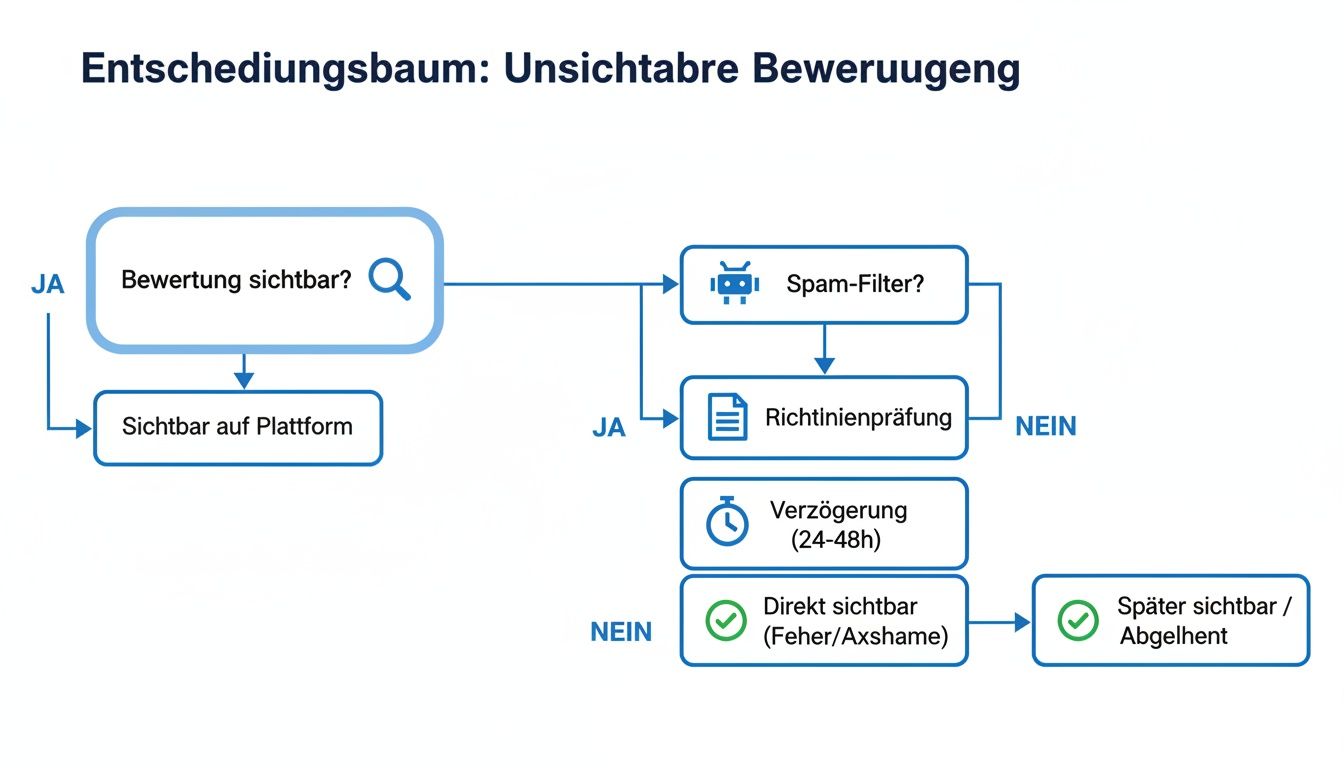
As you can see, most roads lead to the three usual suspects: The rating is stuck in the spam filter, violates a policy, or there is a technical delay at Google.
Technical reasons for invisible reviews
Even though it happens less frequently, technical faults can play a role. An often overlooked classic is caching error. This means that the review is already online, but your browser is still showing you an old, saved version of the page.
You can verify that with these three quick checks:
- Clear your browser cache: It's the easiest way to make sure your browser completely reloads the page from Google.
- Use incognito mode: Open your company profile in a private window. No old data is loaded here, so you'll see the page like a new visitor.
- Change device or network: Access your profile using your smartphone's mobile data network. How to rule out that the problem is with your WiFi or office network.
A structured process saves time and nerves. If you systematically move from simple to more complex causes, you can find the problem more efficiently and fix it in a targeted manner.
This type of systematic analysis is closely linked to overall monitoring of your online visibility. If you look closely, you can recognize patterns more quickly. If you want to go deeper, here's more about how to get your Follow local rankings effectively Can.
Specific steps to restore an assessment
Do you have a guess as to the cause? Instead of waiting, you can take action now. Here are tried and tested steps to make your customer feedback visible.
The most direct way to resolve technical glitches or incorrect filtering is to contact Google Support. This may require patience, but it is the official and often only effective channel. A well-prepared request increases the chances of success.
How to effectively contact Google Support
A simple message such as “My review is gone” is usually not successful. Take the time to make a clear and detailed request. The more information you provide, the faster Google can process your request.
Have the following details ready:
- Your exact company name: Just as it appears in the Google company profile.
- Your profile's maps URL: A direct link provides clarity.
- Reviewer's name: Ask the customer what name they use on their Google account.
- Review date: An approximate time will help with the search.
- The decisive proof — a screenshot: Ask the customer to send you a screenshot of their review from their own Google account. That is the strongest piece of evidence you can provide.
With this information, you can open a ticket via Google's Help Center. Describe the problem factually — for example, that latest reviews are not shown — and attach the documents you have collected.
Tactful communication with the customer
While you wait for an answer from Google, you can simultaneously search for a conversation with the customer. This is often the fastest way, especially if the review got stuck in the filter due to an unfortunate wording.
Address the issue openly. Please explain in a friendly way that Google's automatic filters are sometimes hypersensitive and trigger even small things such as links or special characters. Ask politely if the customer would be willing to briefly adjust their text and try again.
For example, it could sound like this:
“Thank you once again for your positive review! It appears that Google's automatic filter has temporarily blocked them — unfortunately this sometimes happens. Would you be so kind as to check the text once without links and post it again? We would be very happy about that! ”
With this approach, you not only show that you're looking for a solution, but also how much you value the customer's feedback.
Long-term strategies to improve visibility
Every action on your profile is a signal to the algorithm. An actively and professionally managed profile is considered more trustworthy, which can reduce the likelihood of future filter problems.
The importance of this trust is high. A well-known Harvard study and recent analyses confirm: An improvement in the average rating of just one star can increase sales by 5-9% boost. Da 98% When consumers read online reviews, every single review counts. If you want to dive deeper into the subject matter, you'll find further interesting study results on Google reviews on bewertungsbeseitiger.de.
A carefully maintained profile is your best guarantee. In our guide, we'll show you step by step how to make your Manage Google business profile and optimize to sustainably secure the trust of customers and search engines.
Preventive measures against the disappearance of reviews
Once reviews are gone, it takes a lot of effort to restore them. It is more effective to ensure from the outset that they don't disappear in the first place. It's about knowing Google's policies and informing both your profile and your customers in such a way that the algorithm has no reason to complain.
With a proactive strategy, you protect your reviews while increasing trust in your entire company profile. This minimizes the risk of honest customer feedback falling through Google filters.
Helping customers leave reviews
Your customers have good intentions but often don't know the details that can block a review in the system. You don't have to familiarise them with Google's full guidelines — a few subtle notes are often enough.
When you ask for a review, you can point out these points:
- No links: Kindly ask your customers not to include links to other websites or email addresses in the text.
- Avoid using WiFi: A simple tip can be helpful: “It's best to write the review later from home or via the mobile network.” This prevents Google from suspecting a conflict of interest due to the same IP address.
- Describe real experiences: Encourage your customers to share their personal experience instead of using general phrases. Authentic, honest phrases are rated positively by Google's algorithm.
These small notes can often be enough to avoid the most common reasons for reviews to disappear.
A well-maintained profile as a sign of trust for Google
Nothing signals seriousness to Google as clearly as a completely optimized and actively managed company profile. In doing so, they show the algorithm: “We are a real, committed company.” This increases the likelihood that new reviews will be published without problems.
Responding promptly is a key factor every single review — regardless of whether it is positive or negative. This shows commitment and active customer service, which Google regards as a strong sign of trust.
Also keep your profile up to date. New, high-resolution photos, up-to-date opening hours and occasional contributions are clear signs of an active company. In our guide, we'll show you how to do this in detail Optimally set up and maintain a Google company profile.
This is particularly important when it comes to local searches. Current figures show that 86% of Germans search for companies on Google Maps and 46% all search queries have a local connection. When your latest reviews are not shown, you miss out on potential customers. After all 42% The user clicks on the “map pack” in the search results, such as this Compilation of SEO statisticians on aioseo.com shows.
Use automated reputation management
Constant monitoring of all rating platforms is time-consuming. The concern that latest reviews are not shown, manual control and rapid response require a lot of time. In addition to day-to-day business, it is hardly possible for local companies in particular to keep track of things here. An automated approach can reduce this burden and turn your reputation management into a competitive advantage.
Specialized tools like SocialEdge are designed to make this process easier. Instead of manually checking your profiles every day, such a system monitors your reviews in real time. It notifies you immediately if there are any irregularities — for example, if an expected 5-star review is still not online after days.

More than an early warning system: Proactive profile optimization
A good reputation management system can do more than just observe. It is a central tool that not only helps reactively, but also proactively ensures that your reviews remain visible by optimizing your entire Google business profile.
Behind this are strategic adjustments that sustainably strengthen Google's trust in your profile:
- Profile completeness: The system ensures that all fields are filled out optimally — from primary and secondary categories to individual services.
- Visual presence: It helps you to regularly upload high-quality and correctly tagged photos. For Google, this is a clear sign of an active company.
- Consistent data: The software ensures that your company details (name, address, telephone) are the same on all platforms. This prevents confusion in the algorithm.
Such a professionally maintained profile is rated as more trustworthy by Google. The direct result: The probability that legitimate reviews will erroneously get stuck in the spam filter is reduced.
Transparent key figures for measurable success
One of the biggest benefits of an automated approach is measurability. Instead of making assumptions, concise dashboards provide clear figures. You can see at a glance how your visibility is developing, how many calls are being generated via your profile and which measures have the biggest impact.
Automation here does not mean losing personal contact with the customer. On the contrary, it gives you the time to focus on the essentials — offering excellent service and building customer relationships.
With this data-driven approach, you can track the success of your work and continuously refine your strategy. If you want to learn more about how software can support your SEO strategy, read our article about the benefits of a modern SEO app.
Frequently asked questions about missing Google reviews
When an expected customer review doesn't appear, questions arise. Based on our experience with local companies, we have answered the most common concerns for you here.
How long does it take for a new Google review to appear?
A new review is usually within 24 to 48 hours visible.
However, it can also take longer, sometimes up to seven working days. This happens especially when Google's systems review a rating more closely. If your company profile is new or if a customer has written a very long text, a bit more patience is required.
Practical tip: Wait about a week. If the rating is still missing, it is likely no longer a normal delay. That's when it's time to start researching the causes.
A customer reports that their review was not published — what needs to be done?
Stay friendly and proactive. Ask the customer if they can send you a screenshot of their review from their Google account. This is useful if you contact Google Support later.
Address the issue of guidelines carefully. Sometimes the problem lies in a detail, such as a link in the text. Ask if they'd like to try posting the review again without links or special characters. Often, this has already solved the problem.
Does replying to reviews encourage the faster display of new reviews?
Yes, indirectly. Although there is no direct connection, the indirect effect is significant. If you regularly and promptly on all Reviews respond, signal to Google that your profile is being actively maintained.
A well-managed profile builds trust with Google. As a result, the algorithm is less likely to falsely classify new, genuine reviews as spam. Think of it as an important building block for a stable online image.
Summary and next steps
When your latest reviews are not shown, this is usually due to one of three reasons: Google's spam filter, an unintentional policy violation, or a technical delay. A systematic approach is the key to success here. First, check the basics, such as compliance with guidelines and potential technical errors.
If this does not produce any results, Google Support is the next point of contact. Prepare your request carefully and include supporting documents such as screenshots to speed up the process.
In the long term, you can ensure the visibility of your reviews through proactive action. A continuously maintained Google company profile and a strategy for collecting authentic reviews build a basis of trust, which is recognized by Google. Additional information can also be found on pages that more frequently asked questions answer.
Start optimizing your Google business profile today. SocialEdge can help you to ensure that every customer voice is heard and that you position yourself sustainably in local search results. Discover your options on socialedge.ai now.