Why a Google profile is crucial for service providers without a shop
Many entrepreneurs assume that a Google profile is only relevant for businesses with a physical address where customers are received. That is a common misconception. The reality is: Potential customers today are specifically looking for experts in their immediate vicinity, whether for urgent pipe cleaning, IT consulting or professional garden maintenance.
A professionally set up profile as Service companies with a catchment area (Service Area Business, SAB) is the solution here. The key point is not to display an address on the map, but to clearly define your service area. This is exactly what increases your relevance in local search results.
Using local search as an acquisition channel
Imagine someone searching for “heating installer near me.” Google wants to suggest the best and most trustworthy providers in the area to this person. An optimized profile signals to Google: “Here I am, the expert for this region! “This not only strengthens the trust of potential customers, but also places your company in the prominent top results — the so-called Google Maps Pack.
The figures confirm this: In Germany, around 14% of all Google searches on local information or companies. Even more important: whole 42% of users click directly on the results in the Google Maps Pack when searching locally. These places are a direct route to more inquiries. You can find out more about these statistics from the SEO experts at seranking.com.
A Google profile without a shop acts as a digital figurehead that appears exactly where your customers are looking. It converts a local search into a call, a website click, or a specific request.
Build trust and credibility
A fully completed profile with clear service descriptions, photos of your work and positive customer reviews immediately creates trust. It shows that your company is established, professional, and valued by other customers. These factors are particularly important because customers often take a closer look at service providers without a physical store.
The correct setup is the cornerstone of a successful local online presence. In our guide, you'll learn how to your Be able to improve local SEO in a targeted manner. It's not just about being found, it's about being perceived as the best choice in your region.
List a company without a shop on Google: The requirements
Before you your List a company on Google, it is important to understand the specific requirements for service providers who visit their customers locally. Google describes these under the term Companies with a catchment area (Service Area Business, SAB) together. This concept is the basis for every craftsman, consultant or mobile service provider.
A company with a catchment area means: You drive to the customer, the customer does not come to you. Instead of a pin on Google Maps, an area defined by you is displayed — your service area.
The role of the business address for verification
A common question is: “What do I do with the address if I'm working from home? “That is the standard case. Google requires a real, physical address for verification, at which you can be reached by post. This can also be your home address, provided that your business is registered there.
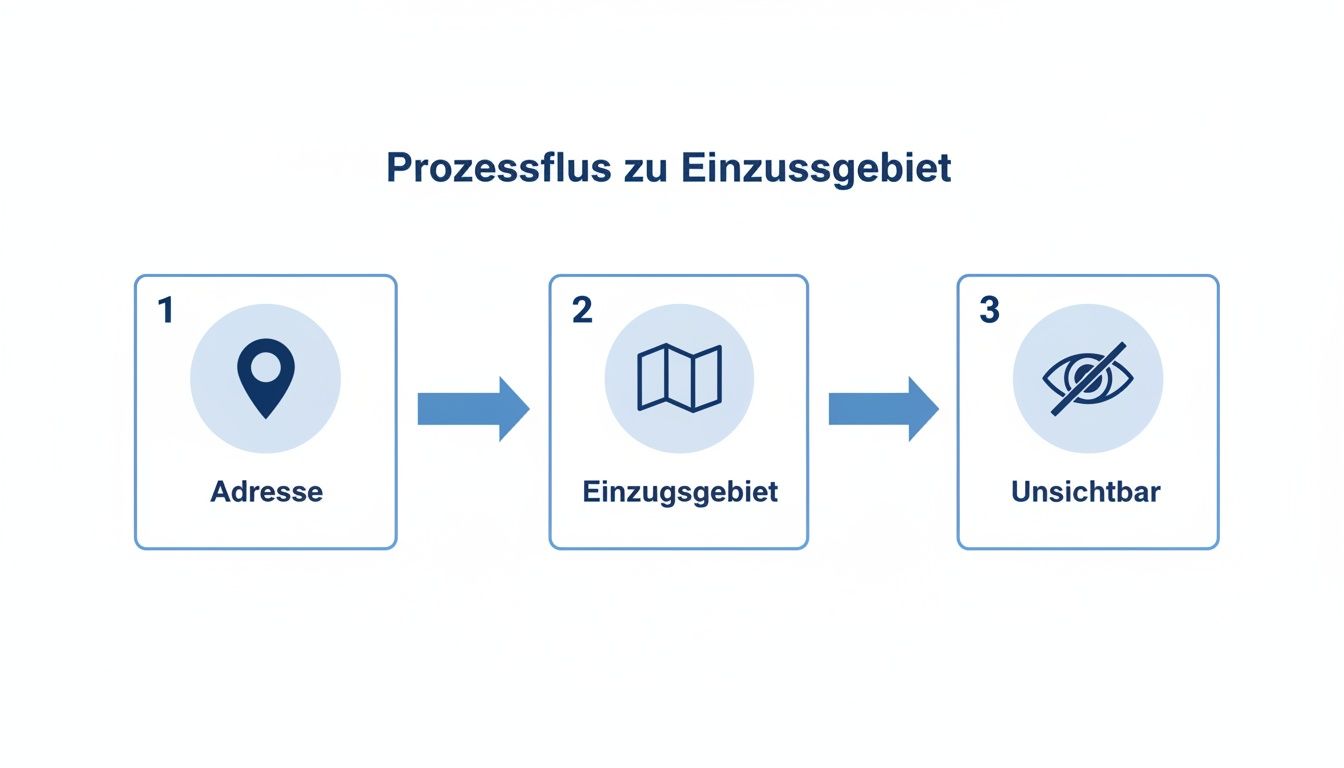
The key point is: This address will not be publicly displayed later. It only serves Google as proof that your company exists and helps prevent fake profiles. When setting up, specify that customers cannot visit you at this address. As a result, it is hidden and only your defined catchment area remains visible.
Note: Do not use mailboxes or pure co-working addresses where you do not have a fixed workplace. Google often detects such attempts, which can result in immediate blocking of the profile.
Strategically define the catchment area
Defining your service area is a strategic decision. You use it to determine where you work and for which local search queries you want to be considered relevant.
You have various options for defining your area:
- By postal code: Ideal for very local activities. A gardener in Munich could specifically specify the postal codes of the districts in which he prefers to work.
- By city or region: Suitable for a larger range of activities, such as an IT consultant throughout the Ruhr region or a mobile vet who covers several districts.
- By state or country: Suitable for specialized consultants or digital service providers with customers throughout Germany.
For example, an electrician from Hamburg could enter the postal codes for Eimsbüttel, Altona and Sternschanze. The more precise the definition, the better Google can match you with the right customer.
A correct configuration right from the start is the basis for your success. It ensures easy verification and protects your profile against blockages in the long term. To strengthen your local authority, also pay attention to Business listings and their consistency in other portals.
Step-by-step: Add a company to Google without a location
Theory is followed by practical implementation. This is where it is decided whether your profile will be found later. The following guide shows you how to list your company on Google, even without a traditional shop.
All you need is a Google account. Go to the Google Business Profile homepage and click “Manage Now.”
The registration process: precision right from the start
First, Google asks for your company name. Enter the exact, official name of your company — as it appears in the legal notice or on your business registration. Avoid adding keywords or places (not “Maler Meier Hamburg,” for example) as this violates Google guidelines and may result in suspension.
Then select the company category. This point is very important for your ranking. Be as specific as you can. Instead of “tradesman,” choose “electrician,” “installer,” or “gardener and landscaper.” Google suggests suitable categories for you. Choose the one that best describes your core business.
The decisive step: hide the address correctly
Now comes the most important moment for service providers without a physical location. Google asks the question, “Would you like to add a location that customers can visit, such as a store or office? “Here you absolutely must “No” select. This answer correctly configures your profile as a service area business.
Google immediately asks for your service area. Here you define where you offer your services — whether individual cities, postal codes or entire regions. Define only the areas you actually serve to maximize your relevance in local searches.
Practical tip: Avoid specifying an unrealistically large catchment area. If you work as a gardener in Munich, it doesn't make sense to define the whole of Bavaria as a service area. Focus on the neighborhoods and counties where your target audience is located. This increases your relevance and ranking opportunities.
The following graphic illustrates the process: You only store an address for verification, define your visible catchment area and ensure that your private address remains invisible to customers.
NAP consistency as a sign of trust
Once you've determined your service area, enter your contact details (phone number and website). Here is the NAP consistency decisively. NAP stands for NAme, Address (address), Phone (telephone number). Even though your address is hidden, your company name and phone number must match exactly what's on your website and in other directories.
Inconsistent data is a negative signal for Google and can affect your ranking. Check all information carefully. Uniform data is a strong sign of trust for the algorithm.
After entering this information, verification follows, during which you confirm that your company exists at the registered address. Details will follow in the next chapter.
If you'd like to dive deeper into creating your profile, check out our guide on the topic Create a Google business profile further valuable information.
Avoid verification problems: This is how it works smoothly
Verification is the step that poses challenges for many service providers without a shop. Google checks this carefully to ensure the authenticity of companies. However, with the right preparation, this process is straightforward.
Google wants to make sure that your company actually exists at the specified (non-public) address. A physical address is therefore mandatory. The verification method offered is determined by the algorithm and cannot usually be influenced.
Overview of common verification methods
Depending on your company's industry, location, and online presence, Google suggests one of the following options:
- postcard: Google sends a verification code to your business address. Make sure that your company name is clearly on the mailbox. Delivery can take up to 14 days.
- Video verification: This method is increasingly being used by service companies. A Google employee will video call you. You must show your business premises, tools or a company vehicle.
- Email or phone: The quickest option. You will receive a code via email (to an address with your company domain) or by call/SMS. This method is usually only offered to companies that are already classified as trustworthy.
After successful verification, the actual optimization work begins. For care tips, see our guide on how to your Manage Google business profile the right way.
Common verification mistakes and how to avoid them
It is often small things that delay the verification process. The most common cause is inconsistent data. A company name in the profile that differs from the business registration will almost certainly result in rejection. Another stumbling block is the address: Mailboxes or virtual offices are not allowed.
Practical example: A craftsman registers his company at a co-working address. During a video call, he cannot prove that he has a fixed workplace or tools on site. The verification fails and the profile may be suspended.
Preparing for video verification
Since the video call is particularly relevant for service providers, you should prepare yourself specifically to ensure a smooth process.
Video call checklist:
- Official documents: Have your business registration or the excerpt from the commercial register ready. Name and address must match the profile information.
- Evidence of activity: Show off your tools, materials, or home office. A labelled company vehicle is strong proof.
- Branding: Business cards or stationery with your logo and the correct address confirm your legitimacy.
- Proof of location: A current utility bill (electricity, gas) in your company name and address can serve as additional proof.
If a method fails, Google often offers an alternative or you can contact support. Document the process with screenshots and have all evidence ready.
Get the most out of your Google business profile
A verified profile is just the start. Now it's a matter of turning it into an effective tool for acquiring customers. You need to show Google and potential customers why you're the best choice. An incomplete profile looks unprofessional and is rated worse by Google's algorithm.
Services and photos: Show off your expertise
The first step towards optimization is a detailed list of your services. Instead of specifying “plumbing” in general, you will be more specific: “pipe cleaning”, “bathroom renovation”, “heating maintenance.” Each specific service is an additional keyword that customers can use to find you.
Good photos are critical to building trust because customers can't visit you locally.
- projects: Show before and after pictures or completed work.
- Team at work: Photos of employees look authentic and create a personal connection.
- equipment: A clean, branded company car and professional tools signal seriousness.
An actively maintained profile signals relevance to Google. Profiles with recent content are preferred in search results.
Contributions and reviews to strengthen credibility
Use Google posts to share offers, news, or seasonal promotions. An article with “Tips for winter-proof heating” positions you as an expert.
Dealing with reviews is even more important. Positive reviews are a strong ranking factor. Actively ask satisfied customers for a review. And respond to every review — both positive and negative. A professional response to criticism shows a service orientation.
Checklist to optimize your profile
Use this checklist to optimize your profile and To sustainably improve Google Maps ranking.
- Enter services in detail: Include each achievement with a brief description.
- Upload photos regularly: Please upload at least 10-15 compelling images
- Post posts weekly: Share offers, news, or useful tips.
- Actively ask for reviews: Include a review link in your email signature.
- Respond to reviews in a timely manner: Thank you for praise and deal constructively with criticism.
- Use questions & answers (Q&A): Proactively answer frequently asked questions.
In addition to direct optimization, you can also AI-powered SEO strategies help increase your visibility. Profile optimization is an ongoing process.
Frequently asked questions about the Google company listing without a shop
Here you will find answers to common questions that service providers without a fixed shop location encounter when creating their Google profile.
Can I provide my private home address for verification?
Yes, that is possible as long as it is the official headquarters of your company and you can receive mail there. It is important that you enter the address as not public mark. Google needs this information internally for verification. The address remains invisible to customers; they only see your defined catchment area.
What if I want to change my catchment area later?
Your catchment area is flexible and can be adjusted at any time in your Google business profile settings under “Location and areas.” This is useful when you're expanding into new cities or shifting your focus to specific areas of the city.
A precisely defined catchment area signals to Google which local search queries your company is relevant for, which improves your ranking opportunities.
Help, my profile has been suspended! What now?
A profile lock can often be released. The cause is usually a violation of Google guidelines. Proceed systematically:
- Keywords in the company name: Additions such as “Best Painter in Berlin” are not allowed.
- Invalid addresses: Mailboxes or virtual offices are not accepted.
- Inconsistent data: Do the company name and phone number match what is on your website and in other directories?
- Correct any mistakes.
- Set a Request for recovery via the official Google form. Have evidence available, such as a business registration or photos of your company vehicle.
Summary and next steps
A Google company profile is an indispensable tool for service providers without a shop. It is often the first point of contact for potential customers in Google search and on Maps. The correct establishment as a “company with a catchment area” and smooth verification are the basis for your local visibility.
By consistently optimizing your profile — with detailed services, authentic photos and active review management — you turn a simple entry into an effective channel for acquiring customers.
Don't wait any longer. Every week without an optimized profile is a missed opportunity to be found by customers close to you. Start implementing the steps presented today. The effort will pay off through more visibility, more trust and more inquiries.
Would you like to concentrate on your core business and leave local optimization to an experienced team? We at SocialEdge specialize in getting service providers like you to the top of local search results.
Find out how we're taking your local marketing to the next level.