Why a Google company profile is essential for companies
The question is no longer whether You should be on Google, but How good. A professionally managed Google company profile is more than just an address book entry on the Internet. It is a tool that creates trust and builds a direct bridge to your target audience.
A typical scenario: Someone searches on their smartphone for “hairdresser near me” or “emergency heating service.” What's happening? Google immediately presents a map with the most relevant providers in the area — the “Local Pack.” This is exactly where you want to appear prominent, and an optimised profile is your ticket.
The first impression of a Google listing is decisive
A complete profile provides all important information at a glance: opening hours, telephone number, website link and the exact address. Prospects can click through photos of your store, read reviews from other customers, and start the route with a single tap.
This easy access to information creates trust and makes the next step easier. Conversely, an outdated or incomplete profile can quickly act as a deterrent and lead potential customers to the competition.
The figures speak for themselves: Studies show that the majority of consumers regularly search online for local companies. A completely completed profile can significantly increase the purchase probability.
To make the benefits more tangible, here is a brief overview:
Benefits of a Google business profile at a glance
Benefit descriptionSpecific benefitBetter visibilityYour business is shown in local search results and on Google Maps. You can reach more potential customers in your immediate area.Increased trustRecent photos, positive reviews and complete information create credibility. Customers are more likely to choose a company that they rate as trustworthy.Direct interactionsFeatures such as Call, Plan Route, or Visit Website are just a click away. They lower the hurdle to getting in touch and generate more leads.competitive advantageA well-maintained profile sets you apart from competitors who neglect this channel. You get the attention that others leave unused.
This summary shows that there is much more to it than just being found.
A well-maintained Google company profile is not a passive listing, but an active marketing tool. It converts search queries into real customers — be they phone calls, store visits, or website clicks.
This direct connection to customers is a central component of any local marketing strategy. To dive even deeper into the topic, read our guide on how to complete your entire Google can improve SEO marketing strategy. It's about opening the digital door to your real business as far as possible.
List your company on Google: A step-by-step guide
Now it's getting concrete. Registering your own business with Google is a clearly guided process. However, you should be careful here. Think of this step as the foundation of your house: The more solid you cast it, the more stable everything you build on it will be later.
Before you get started, check whether an entry already exists for your company. It happens more often than you think. Sometimes Google automatically creates profiles, or a previous owner was already active. A quick search on Google or directly in Google Maps with your company name and address provides clarity. A duplicate entry only causes confusion later on.
The basis: enter company data cleanly
If no entry is found, start creating a new one. The linchpin is your master data: company name, address and telephone number. In technical language, these are NAP data (name, address, phone) and they are decisive for your local ranking.
The golden rule here is: Be consistent! Your company name must be written exactly as it appears on your website or company sign. Avoid adding keywords or place names to the title — this violates Google guidelines and can have negative consequences.
A practical tip: Make sure that your NAP data is the same everywhere on the network. Even small deviations, such as “street” and sometimes “street” or another spelling of the telephone number, weaken Google's trust in your data. This can have a negative impact on your visibility.
By the way, this consistency doesn't just apply to Google. If you want to delve deeper into the topic, take a look at our guide about the most important industry directories for local companies.
Setting the course: choosing the right company category
One of the biggest levers for your ranking comes right after the master data: choosing the company category. Google provides an extensive list here. With your selection, you clearly tell the algorithm what your company offers.
- The main category: That is the most important decision. Select the category that best describes your core business. A restaurant with a focus on pizza should choose “pizzeria” and not just the general “restaurant.”
- More categories: You can further specify your offer here. For example, the pizzeria could add “delivery service” or “Italian restaurant” to cover further searches.
Take a moment to complete this step. See which categories your direct competitors are using. A wisely chosen main category can determine whether you appear high up in relevant searches. This is the first important cornerstone.
Verify your company profile: This is how your listing becomes official
The basic information has been entered. Now comes the crucial step for your Google business profile to go online and give you full control over it: verification.
With this proof of your existence, Google provides you with the digital key to your company. Without verification, your profile is just an empty shell. It doesn't create trust with potential customers and leaves the benefits for your visibility unused.
This process ensures that only you, as the legal owner, can edit the profile. This is important protection — for you against manipulation and for your customers against misleading information. Depending on your industry, business type, and location, Google suggests different ways to confirm this.
This schedule summarizes the essential steps, from initial testing to preparation for verification.
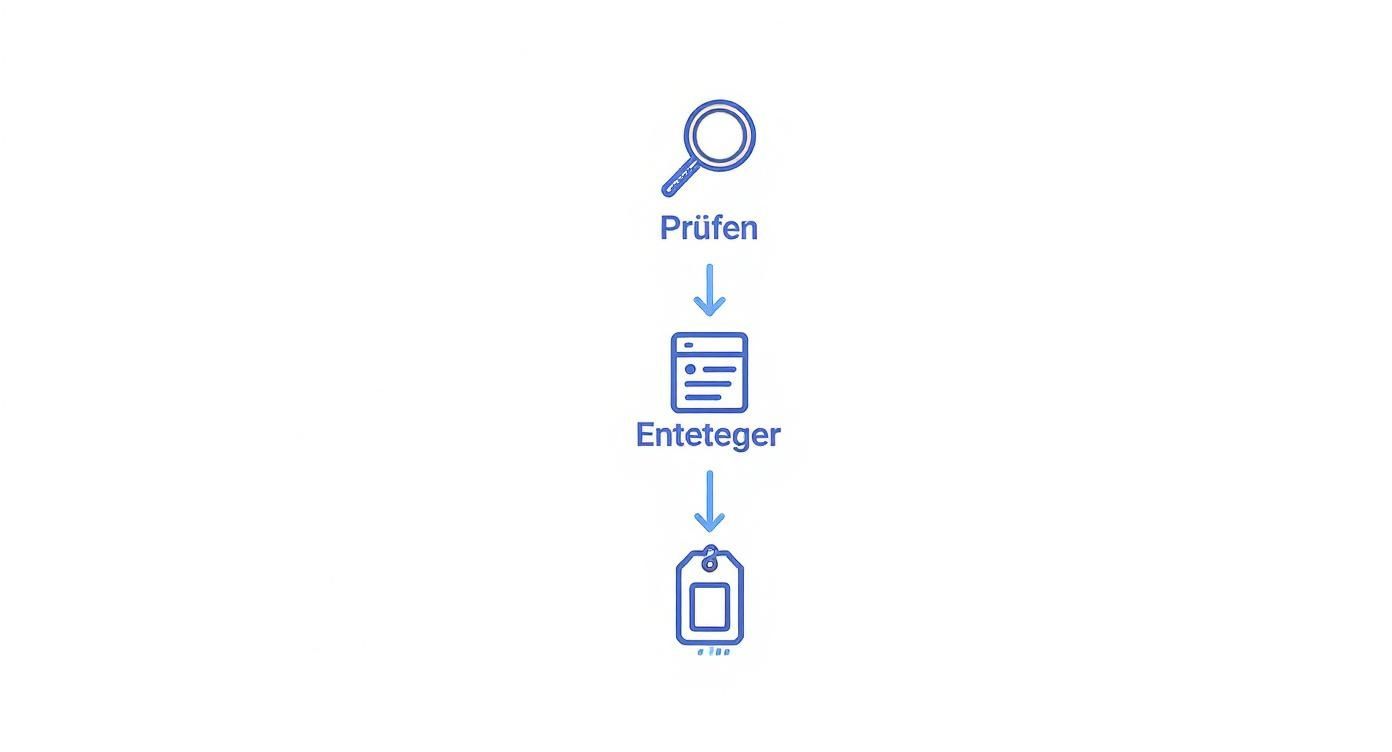
It's easy to see that once the data has been entered and the categories have been strategically selected, the way is paved for the actual verification.
Which verification method is right for my company?
Google usually decides for itself which method it offers you. It depends on many factors and you are not always free to choose. Still, it's good to know the most common options.
- The classic: postcard. This is the most common method. Google sends a postcard with a 5-digit verification code to your specified business address. This path serves as reliable proof that your company actually exists in this place.
- Quick and direct: telephone or text message. Some companies have the option to confirm immediately. Here you will receive the code by phone or text to the stored business number and can enter it directly online.
- For digital professionals: email. Works in a similar way to over the phone, except that the code goes to a business email address. It is important here: The email address must be on the same domain as your website (e.g.
info@ihre-firma.deAnd notihre-firma@gmail.com). - Very modern: video verification. This is where you start a quick video call with a Google representative. You have to show things like your shop from outside, the company sign, work tools or official documents to prove your existence live.
All of these methods have only one goal: to prove beyond doubt that your company exists and that you are the legal representative. A tip: If you expect the postcard, delivery can take up to 14 days last. Do not request a new code during this time, as this will invalidate the old one.
Optimize your Google company profile for maximum visibility
The verification was the ticket. Now the work begins, turning your listing from a digital business card into an effective marketing tool. It's not just about being listed on Google, but about convincing potential customers at the decisive moment.
An optimized profile determines whether you are high up in search results when someone searches for your offers.
The first impression is usually visual. High-quality, authentic photos and videos are a powerful lever here. Show off your business inside and out, your team at work, or your products in action. Such images create a personal connection and give your profile a credibility that pure text descriptions can barely achieve.
Fill your profile with useful information
When the visual frame is in place, it's about the details that make the difference for customers. Use the various areas to make your offer tangible and understandable.
- Services and products: Don't just list what you're doing. Describe your offerings briefly and concisely. Add prices where it's convenient. This helps users make a quick decision.
- Questions and answers: This section is often neglected. Proactively answer questions you're frequently asked, such as “Are there parking spaces available? ” or “Do you also offer vegan options? ”. This saves you and your customers time.
Every completed detail signals to users and the Google algorithm that your profile is up to date, maintained and relevant.
The basis for local authority: Consistent company data
One factor that is often overlooked but is crucial for a strong local ranking is the consistency of your NAP data (name, address, telephone number). Google compares the information in your business profile with data on other platforms, such as business directories or your own website.
If this core data matches exactly everywhere on the Internet, Google regards this as a strong signal of trust. Any small discrepancy can weaken that trust and affect your visibility.
A large proportion of all Google searches are local. For many of these queries, the “Local Pack” is played — the prominent map view with the top three results. A perfectly optimized and consistent profile is your best chance of reaching one of these places.
Plus, keep your profile lively by posting regularly, updating attributes (such as “WiFi available”), and fresh photos. To get the most out of your listing, we've summarized more tips in a separate article on how to your Optimize Google business profile Can.
Use customer reviews as a sign of trust for your company
When you list your company on Google, reviews quickly become an important factor. You often decide whether a potential customer contacts you or clicks on to the next provider. A profile without reviews seems impersonal, while a profile with lots of positive feedback sends a strong social signal.
Good reviews are more than just recognition. You have direct influence on how prominently your company appears in local search results — especially Google Maps. Every positive review signals to the algorithm that this business is relevant and trustworthy.

Proactively ask for feedback — but correctly
The best way to get more reviews is to ask satisfied customers about them in an active and friendly way. Don't just wait and see. The ideal moment is right after a successful deal, when the positive experience is still fresh.
Here are a few best practices that are compliant with the guidelines:
- Ask in person about: A simple “We would appreciate a quick review on Google” after a good conversation can go a long way.
- Send a link via email or text message: Include a direct link to your Google review profile in a follow-up message. Make things as easy as possible for your customers.
- Place reminders in store: A discreet display on the counter or a QR code on the invoice can also encourage feedback.
Important: Never offer incentives such as discounts for reviews. This violates Google guidelines and may result in the deletion of reviews.
The importance of Google reviews can be summarized in figures. Studies show that companies with a high average rating receive significantly more inquiries. You can find more information about this here: Learn more about the impact of Google reviews.
Respond confidently to any type of assessment
Using them correctly is just as important as collecting reviews. A response shows that you take customer feedback seriously — that goes for praise as well as criticism.
A thoughtful response to a negative review can turn a bad experience into an opportunity. This shows not only the dissatisfied customer, but all future readers that you take problems seriously and act in a solution-oriented manner.
In the case of positive reviews, a short, personal thank you is often enough. Avoid standardized phrases. If feedback is negative, remain professional, apologize for the negative experience, and offer to resolve the issue offline. A strong review profile is a key lever for your To improve ranking on Google Maps and build trust over the long term.
Common questions (FAQ) about Google Business Profile
Even though the process for creating your own Google listing is fairly straightforward, the same questions arise again and again in everyday life. Here you will find clear answers to the most common uncertainties.
Does it cost anything to list my company on Google?
No Creating, validating, and maintaining your Google business profile is gratuitous. Google has an interest in local search results being as accurate and helpful as possible and is therefore making this tool available free of charge.
There are only additional costs if you decide to Google Ads to post paid ads to make your profile stand out more. The organic entry itself remains unaffected.
What do I do if my company has already been claimed by someone else?
It may happen that your company already has a profile that is managed by someone else. That is no reason to panic. Google has a standardized process for this.
Follow the instructions in the profile to “request access.” Google then sends a message to the person who is currently managing the profile.
- The current owner is not responding: If the person doesn't get in touch within three days, Google often gives you the option to claim the profile directly.
- The request is denied: If the administrator refuses to hand it over, you can file an objection. Contact Google Support and have evidence, such as your business registration, ready to prove that you are the legal owner.
In most cases, Google will review the issue and give you control.
It is important that you take action. An externally managed profile can damage your reputation if it contains incorrect information.
How often should I update my Google Business Profile?
Regularity is critical to signal to Google that your business is active and relevant. A good rule of thumb is to at least once a week To briefly deal with the profile.
It doesn't have to be a big hassle. Even small actions make a difference:
- Create a new post: Share a recent offer or news
- Upload a fresh photo: Show off a new product or your team
- Reply to a review: A quick “thank you” or a professional response to criticism has a positive effect.
- Answer questions: See if customers have asked questions and answer them promptly.
It is particularly important to adjust your core data immediately. If opening hours, telephone number or address changes, this must be immediately updated in the profile, as outdated information frustrates customers.
Summary and next steps
Registering your company on Google is a fundamental and free step towards greater visibility. A fully completed, verified and regularly maintained profile attracts customers, creates trust through reviews and gives you a clear advantage over the competition. Remember that consistency in your company information (name, address, telephone) and active maintenance through posts and photos are critical to success.
If you want to list your company on Google and consistently get it to the top of local search without worrying about all the details yourself, SocialEdge Your partner. We professionally optimize your profile, manage your reviews and ensure that you are found by the right customers.